



Q2 Web Browsers: Introduction
INTRODUCTION
A web browser is a software application that allows you to access the Internet, view websites, and search for information online. You might use Chrome, Edge, Safari, or another browser to view this website page.
In this Quest, you will learn about web browsers and how to create new tabs, minimize and maximize, restore the browser, and use shortcuts.
learning objectives
I can:
- Identify the main parts of a web browser.
- Minimize, maximize, close, and restore a browser window.
- Understand that different browsers have similar features but may look different.
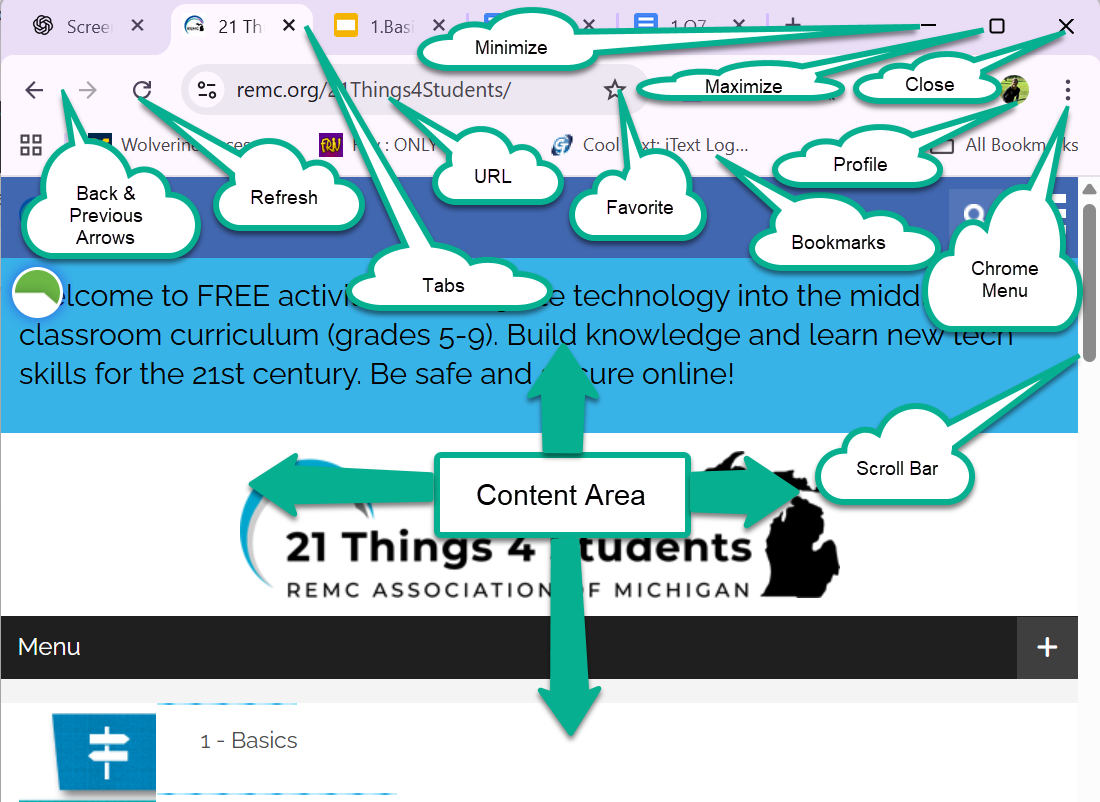
Before moving on, read each of the speech bubbles in the image below. Can you explain what each word means or its function in the web browser? Jot down your thoughts to reference when going through this Quest. Update your notes as you learn more about each item.


Competencies & Standards
MITECS Michigan Integrated Technology Competencies for Students
1. Empowered Learner
c. Students use technology to seek feedback that informs and improves their practice and to demonstrate their learning in a variety of ways.
d. Students understand fundamental concepts of how technology works, demonstrate the ability to choose and use current technologies effectively, and are adept at thoughtfully exploring emerging technologies.
Websites and Documents
No Websites or Documents on this Introduction Page