



Q3 Web Presence: Create a Web Page
Create a draft web presence
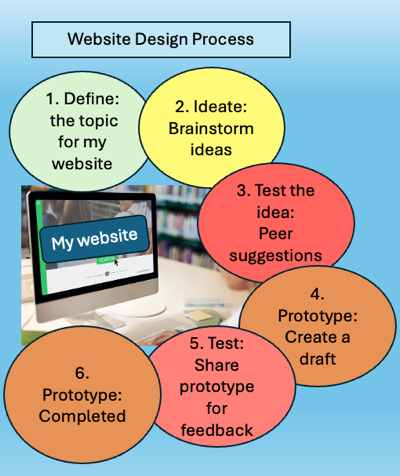
You will use some of the steps in the Design Thinking Process to create a draft of your website presence.
Talk with your teacher about the program you will be using to create a web page, such as Google Sites, Canva, or another recommended resource.
Note: Students under 13 can only have their own published web page when created using a unique student account and with signed parental/guardian permission.
The following documents are provided for creating a draft of your website:


Competencies & Standards
MITECS Michigan Integrated Technology Competencies for Students, and
1. Empowered Learner
a. Students connect their learning needs, strengths and interests to their goals and use technology to help achieve them and reflect on their progress.
2. Digital Citizen
a. Students manage their digital identity and understand the lasting impact of their online behaviors on themselves and others and make safe, legal and ethical decisions in the digital world.
c. Students safeguard their well-being by being intentional about what they do online and how much time they spend online.
d. Students take action to protect their digital privacy on devices and manage their personal data and security while online.
6. Creative Communicator
a. Students choose the appropriate platforms and digital tools for meeting the desired objectives of their creation or communication.
b. Students create original works or responsibly repurpose or remix digital resources into new creations.
c. Students use digital tools to visually communicate complex ideas to others.
d. Students publish or present content that customizes the message and medium for their intended audiences.
Websites and Documents
Websites
21t4s Documents & Quizzes