



QM6 Microsoft Word: Sweet Tools Introduction
Introduction
In this Quest, you will learn about keyboard shortcuts, text-to-speech, Immersive Readers, speech-to-text, emojis, and translation.
LEARNING OBJECTIVES
I can:
- Use numerous keyboard shortcuts.
- Use keyboard shortcuts in my everyday life.
- Share shortcuts with friends and family.
- Use text-to-speech to read a document.
- Use speech-to-text instead of typing in a document.
- Use features to translate documents from one language to another.
- Insert and use emojis in Word documents.
Play Keyboard Shortcuts
Microsoft Word has many keyboard shortcuts to navigate, format, and edit. In this activity, you will play a game that tests your knowledge of keyboard shortcuts.
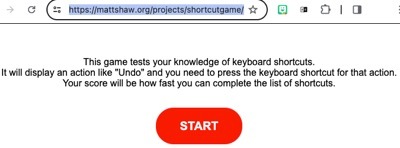
The game above will display an action like Undo, and you need to press the keyboard shortcut. Your score will be how fast you can complete the list of shortcuts. Play it at least 2-3 times to improve your time!! Select the keyboard shortcut game link above. Let's get started!
Here is a list of the shortcuts to review before you play the game, or before you play your second round.


Competencies & Standards
MITECS Michigan Integrated Technology Competencies for Students, and
1. Empowered Learner
a. Students connect their learning needs, strengths and interests to their goals and use technology to help achieve them and reflect on their progress.
b.Students build networks and customize their learning environments in ways that support the learning process.
d. Students understand fundamental concepts of how technology works, demonstrate the ability to choose and use current technologies effectively, and are adept at thoughtfully exploring emerging technologies.
Websites and Documents
Websites
- El león y el ratón
- Keyboard Shortcut Game
- Library of Congress Website
- Microsoft Word 365 Keyboard Shortcuts list (.PDF)
- Windows Tips & Tricks: Emojis
21t4s Videos
- Immersive Reader and Microsoft Office 365 Video (8:22)
- Immersive Reader & Word on the Desktop App Video (2:39)
21t4s Documents & Quizzes